BLOG & ARTICLES
Thoughts on journaling, memory and wellbeing.
Inspiration, guides and much more about living, traveling and keeping a diary.
Day One Alternatives: Private Journal Apps Without a Subscription
Private Journal Apps to Try Instead of Day One Without a Subscription
Day One earned its reputation. Its yearly subscription is another matter. Here is where people go instead, and what they give up by leaving.
The most common Day One alternatives are Apple Journal for a free built-in option, YearDiary for multi-year diary keeping, Diarium for a one-time purchase, and Journey for cross-platform use. Which fits depends on why you are leaving.
Let's start with fairness, because Day One deserves it. It has been the reference journaling app since 2011: a polished writing experience, entries that hold photos, video and audio, end-to-end encryption for sync, and apps on everything from iPhone to Android to the web. People do not leave Day One because it is bad. Nobody serious claims that.
Full disclosure, too: YearDiary is our app, and it appears below. Read that entry with appropriate suspicion.
Why do people look for Day One alternatives?
Three reasons come up again and again
The subscription. The free tier allows one device and one photo per entry, which rules it out as a real home for most diaries. As of mid-2026 the paid plans are Silver at $49.99 a year and Gold at $74.99 a year. Over a decade of journaling, that is several hundred dollars for the privilege of reading your own diary. For some people the app earns it. Others resent renting access to their own past, and for a lifelong habit that feeling only grows.
The weight. Day One has grown into a big app: multiple journals, templates, integrations, and lately AI features. If your diary is three honest lines a night, the machinery can feel like using a truck to post a letter.
The principle. Some diarists simply want their words on their own device and their own cloud, not in anyone's account system, encrypted or otherwise.

The alternatives at a glance
App
Pricing model
Privacy approach
Best for
Apple Journal
Free, built in
Your device and iCloud
Starting out at zero cost
YearDiary
Free core, premium or lifetime
Your device and iCloud, no account
Multi-year diary keeping
Diarium
One-time purchase
Syncs via your own cloud
Refusing subscriptions entirely
Journey
Free tier, then subscription
Cloud account based
Mixed Apple and Android life
Apple Journal: the zero-cost exit
If the subscription is your whole objection, the app already on your iPhone may settle it. Apple Journal is free, pleasant to write in, locked behind Face ID, and its suggestion engine nudges you with material from your photos and activity on quiet days. Since the 26 releases it runs on iPad and Mac too.
What you give up from Day One: the deep feature set, flexible export, and any real year-over-year reflection. Journal is a feed you scroll, not an archive you converse with. Fine for building the habit; thinner as the years stack up.
YearDiary: for the long game (ours)
YearDiary is a private digital 5 and 10 year journal for iPhone, iPad and Mac that shows what you wrote on the same date 1, 5 and 10 years ago. Where Day One is a general-purpose journal with an On This Day feature, YearDiary inverts the priority: the daily meeting with your own past is the product, in the tradition of the classic 5 year journal. No account exists; entries live on your device and in your own iCloud. The core is free, and the premium tier can be a one-time lifetime purchase instead of a subscription, which is rather the point of this article.
What you give up from Day One: Android and web access, the media-rich entry format, and a decade of maturity. We wrote an entire honest comparison with Day One naming the cases where you should choose them instead of us.
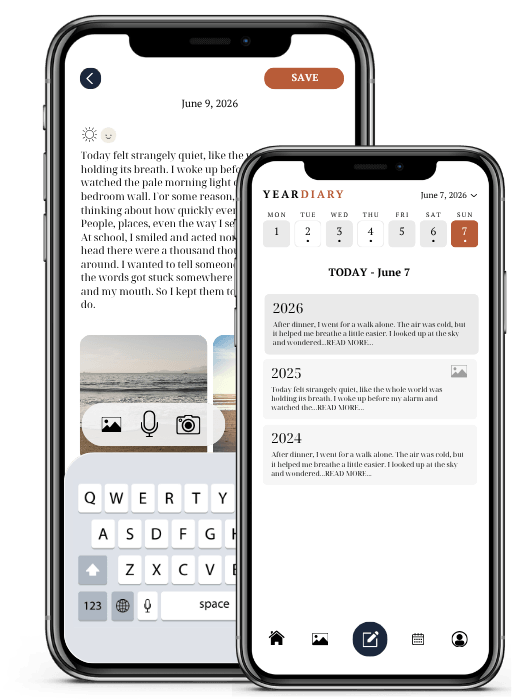

Keep this moment.
Write one line in YearDiary today and read it again on this day next year.
Diarium: buy it once, own it
Diarium takes the old-fashioned position that software is something you purchase. One payment per platform, no subscription, and sync runs through your own cloud storage rather than the developer's servers. It covers an unusually broad set of platforms, including Windows, which almost nothing else on this list does. The design is more utilitarian than lovely, and that is the honest trade: charm for ownership. More pay-once options live in our guide to journal apps without a subscription.
Journey: the cross-platform path
Journey is the closest thing to Day One's shape: a polished, media-friendly journal spanning Apple, Android, Windows and the web. If you are leaving Day One for reasons other than subscriptions, note that Journey's full feature set is also subscription-gated, and its sync is built on cloud accounts. It solves the platform problem, not the pricing one.
Can you take your Day One entries with you?
Yes, and do this before anything else. Day One can export your journals in standard formats, including JSON and PDF, from its settings. The PDF is a readable archive of your writing regardless of what app comes next; the JSON keeps the data structured. Whichever alternative you choose, export first, verify you can open the files, and store a copy somewhere you control. A diary you cannot move was never fully yours, which is also a fair test to apply to whatever app you move to. Our guide to private diary apps includes export in its checklist.
The decision, condensed
Leaving over price, staying on Apple: Apple Journal now, YearDiary when you want your past resurfacing daily.
Leaving over subscriptions on principle: Diarium, or YearDiary with the lifetime purchase.
Leaving for Android or Windows: Journey or Diarium.
Actually happy with Day One apart from a niggle: stay. Ten years of entries in a good app beat year one in a perfect one.
The wider field, including mood trackers and other formats, is covered in our full guide to the best diary apps for iPhone.
An app is a container. The diary is the years of honest lines you put in it. Choose the container you can imagine holding decades, then stop shopping and start writing.
Frequently asked questions
Mostly pricing: the free tier is limited to one device and one photo per entry, and the paid plans are yearly subscriptions. Others find the app heavier than their needs, or prefer a diary stored on their own device and cloud without any account at all.
Diarium is a one-time purchase per platform. Apple Journal is completely free and built into Apple devices. YearDiary has a free core with premium available as a one-time lifetime purchase as well as a subscription, so recurring payment is optional.
Yes. Day One exports journals in JSON and PDF formats from its settings. Export before switching apps, check the files open properly, and keep a copy in storage you control. The PDF gives you a permanently readable archive whatever app you use next.
THE LASTEST POSTS
Thoughts on journaling, travling and life.
Inspiration, guides and much more about living, traveling and writing diary.
YEARDIARY
©2026. All rights reserved.
Powered by connection, clarity, and community.