BLOG & ARTICLES
Thoughts on journaling, memory and wellbeing.
Inspiration, guides and much more about living, traveling and keeping a diary.
Best Private Diary App That Keeps Everything on Your Device
Which Private Diary Apps Keep Your Entries on Your Device?
You are about to tell an app things you have never said out loud. It is worth five minutes to find out where those words will live.
The most private diary app keeps entries on your device and in cloud storage you own, requires no account, and locks behind Face ID or a passcode. Several apps meet that bar; most do not.
This matters more for a diary than for any other kind of app. Your notes app holds shopping lists. Your diary holds the argument with your mother, the health scare, the thing about your job you have not told your partner yet. Full disclosure: YearDiary is our app and it appears below, but the checklist that follows works on any app, including ours. Run it before you trust anyone with your inner life.
Where do your entries actually live?
Every diary app stores your words in one of three places, and the difference is the entire privacy question.
On your device and your own cloud. The app writes to your phone's storage and syncs through your personal iCloud or similar. The developer runs no server that ever holds your diary. This is the strictest model: there is nothing to breach, subpoena or mine, because nothing exists outside your own accounts.
On the developer's servers, end-to-end encrypted. Your entries live in the vendor's cloud, but encrypted so that only your devices hold the keys. Done properly, this is strong too. It asks you to trust the implementation rather than the absence of a server.
On the developer's servers, ordinarily encrypted. The vendor can technically access content. This is normal for social apps and, for a diary, the weakest answer. Many journaling services work this way; their privacy policies say so, in paragraph nine.

How to tell if a diary app is actually private
1. Try to use it without creating an account. If writing requires signing up with an email, your entries are headed for someone's server. Device-local apps have nothing to sign into.
2. Read the App Store privacy label. Every app lists what data is collected and whether it is linked to you. A diary app whose label lists "content" as collected data deserves questions.
3. Check where sync happens. The honest apps name it plainly: your iCloud, your own cloud storage. Vague phrases like "secure cloud" usually mean the vendor's.
4. Look for a real lock. Face ID, Touch ID or a passcode on the app itself, so a borrowed phone does not mean an open diary.
5. Test the export. A private diary you cannot export is private even from your own future. You should be able to get your words out in a standard format at any time.
How the well-known apps compare
App
Where entries live
Account needed
Notes
Apple Journal
Your device and iCloud
Only your Apple ID
Face ID lock, end-to-end iCloud sync
YearDiary
Your device and your iCloud
No
No developer server exists
Day One
Vendor cloud for sync
Yes, for sync
End-to-end encryption offered
Diarium
Your device and your own cloud
No
You choose the sync service
All four are defensible choices, which is exactly why they are the ones worth comparing. Apple Journal and YearDiary take the no-server route inside the Apple ecosystem. Diarium does the same while letting you pick the cloud. Day One runs its own sync but offers end-to-end encryption, the strongest version of the server model; our Day One alternatives guide covers why some people still prefer serverless.

Keep this moment.
Write one line in YearDiary today and read it again on this day next year.
Where YearDiary fits (ours)
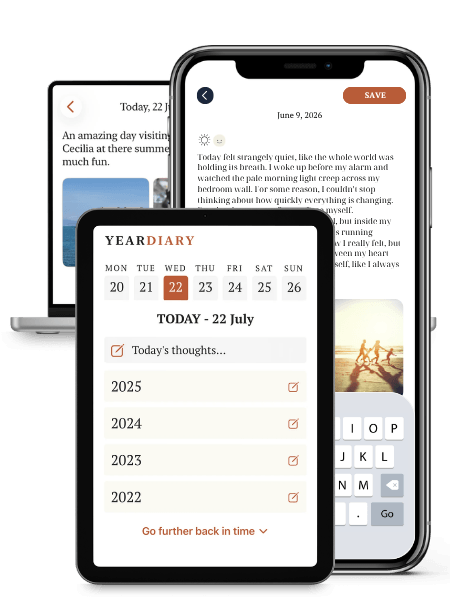
YearDiary is a private digital 5 and 10 year journal for iPhone, iPad and Mac that shows what you wrote on the same date 1, 5 and 10 years ago.
It was built on the no-server model from the start: there is no YearDiary account, entries stay on your device and sync through your own iCloud, and the app locks with Face ID, Touch ID or a passcode. We cannot read your diary, run analytics on it or hand it to anyone, because it never reaches us.
The honest limits are the flip side of that design. No web version can exist, since a web version would require our server to hold your entries. And it is Apple-only, so the privacy model travels with the ecosystem.
Privacy habits that matter more than the app
A quick word on the human layer, which breaches more diaries than any hacker.
Lock the app, not just the phone. The people most likely to open your diary already know your phone code.
Keep the diary off shared devices. A family iPad is not the place, whatever the app.
Mind the backups. If you export your diary, the exported file inherits none of the app's locks. Store it somewhere encrypted.
Pricing also belongs in a privacy article, oddly enough. An app with no subscription income has to make money somehow, and with free apps that somehow is occasionally your data. A clear pricing model, whether a fair subscription or a one-time purchase like the ones in our no-subscription guide, is itself a privacy signal: you can see what the business runs on.
The bottom line
For most iPhone users the private shortlist is short: Apple Journal if free and built-in wins, YearDiary if you want the diary format built for years of looking back, Diarium if you want to choose every piece yourself, Day One with end-to-end encryption if you need it everywhere. The wider comparison, privacy included, is in our guide to the best diary apps for iPhone.
Write as if no one will ever read it. Choose the app that makes that a fact rather than a hope.
Frequently asked questions
The strictest model is an app with no server at all: entries stay on your device and your own cloud, with no account to create. Apple Journal, YearDiary and Diarium work this way. Day One stores entries on its servers but offers end-to-end encryption.
Some technically can. If an app requires an account and syncs to the vendor's cloud without end-to-end encryption, the company can access content. Apps that keep entries on your device and your own iCloud, with no developer server, cannot read them at all.
Yes. Apple Journal needs only your existing Apple ID, and YearDiary and Diarium require no sign-up at all. Needing an email account to start writing is usually the sign that your entries will live on the developer's servers rather than your own device.
THE LASTEST POSTS
Thoughts on journaling, travling and life.
Inspiration, guides and much more about living, traveling and writing diary.
YEARDIARY
©2026. All rights reserved.
Powered by connection, clarity, and community.